Monday, April 6, 2009
Yes, security is fun [sometimes]
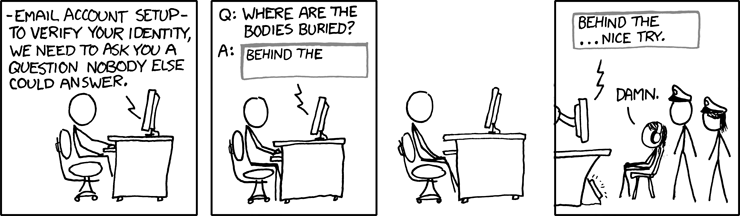
As matter of fact, security people need to watch carefully other people's security blunders so they indeed get a good laugh every time somebody falls in a known trap. (Less if the fallen one is their employer.) The problem is not to get some fun with security, it's to share it with normal, not-security people. XKCD comics takes the challenge, as is the case today:


Wednesday, April 1, 2009
Opensource revolution: a map for good!
A dozen of free software personalities were gathered today in Marne-la-Vallée, near Paris, for a little mediatized meeting. The meeting took place in a little pub called "Billy Bob's". Richard Stallman, Eric Raymond, Linus Torvalds could be seen there, and there have been rumors about other personalities such as Alan Cox, Vincent-Xavier Jumel, Bruce Perens, the billionaire Mark Shuttleworth or even Andrew Tanenbaum.
The object of the meeting was to make a planning for managed discussions to settle all of the main ideological problems of the free software offer. Of course the first question was to draw a list of these problems. After easy jokes on the choice of VI or EMACS, the hackers (in the good meaning of the term) decided that a short list would be better, and that new items would be added up to this list if the meetings proved successful. They agreed on the following points:
The object of the meeting was to make a planning for managed discussions to settle all of the main ideological problems of the free software offer. Of course the first question was to draw a list of these problems. After easy jokes on the choice of VI or EMACS, the hackers (in the good meaning of the term) decided that a short list would be better, and that new items would be added up to this list if the meetings proved successful. They agreed on the following points:
- Settle for a common communication around the issues of dual license and mixt products [auth: such as MySQL]. The various typical reactions of the GPL defenders should be limited so as not to lessen the progress made by these products that are, all in all, positive for free software.
- Decide of milestones to generalize binary compatibility between all Linux distributions, FreeBSD and OpenBSD. (To non-technical readers, this means that a program compiled for one of the systems should work on the other.) [auth: I wonder if Andrew Tanenbaum's Minix is in the intended target ^^]
- Update the Linux Standard Base to recommend the use of APT rather than RPM.
- Decide of a weapon of embargo against constructors of videocards and other hardware that don't release opensource drivers.
- Possibly include a Window Manager in the Linux Standard Base recommendation. [auth: this point was very debatted.]
Shredding files [3/4]: Please shred the hard drive
At this point, we don't shred files anymore and we shred the empty space when we have time and a motivation.
Now, the last important step is not to forget to destroy all of the data when the hard drive is disposed of. There is a lot of data that you must destroy, even if you destroyed your main "My documents": Internet downloaded files, drafts that you may have forgotten, saved passwords or connection parameters...
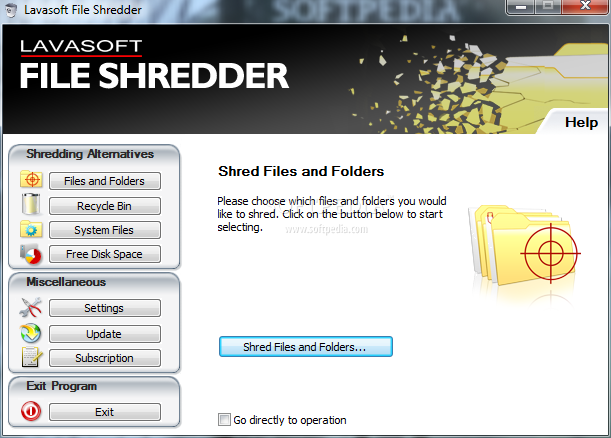
There are countless stories of companies being spied upon by use of their old hard drives. To get rid of this threat, you can use a hard drive shredder such as the one below.

OK. So, good practice is to establish a policy that forbids hard drives (including internal hard drives in the printers and xerox machines) going out before a shred. Don't donate, sell or dump an old hard drive before a shred.
Now, the last important step is not to forget to destroy all of the data when the hard drive is disposed of. There is a lot of data that you must destroy, even if you destroyed your main "My documents": Internet downloaded files, drafts that you may have forgotten, saved passwords or connection parameters...
There are countless stories of companies being spied upon by use of their old hard drives. To get rid of this threat, you can use a hard drive shredder such as the one below.
OK. So, good practice is to establish a policy that forbids hard drives (including internal hard drives in the printers and xerox machines) going out before a shred. Don't donate, sell or dump an old hard drive before a shred.
Tuesday, March 31, 2009
Is Windows 7 closed-source?
It seems easy for the people allowed to test Windows 7 to leak it. My question now: how easy is it for some insider to leak the source or parts of it? I would rather say it's quite possible for a project this size and a company this size.
Now, what about the argument of secrecy? Has security through obscurity twilight a meaning?
Now, what about the argument of secrecy? Has security through obscurity twilight a meaning?
Shredding files [2/4]: Shredding empty space
Once you understand that there are shadow copies of your files of value, you get it that it's useless to shred files, as is often recommended, though.
So what's next, how to ensure your files are not recovered? At this point in our reflexion, the problem is that there are confidential bytes in the "empty" space of the hard drive. So, some software provide a tool to "shred" the whole of the empty space. Here, we mean that it will browse the full length of the empty part of the disk and cover it with random patterns, to remove all chances of recovery of the previous data.

The good point is: theoretically it works. The bad point is: practically, it's unmanageable because it means using those random patterns on the size of the empty space of your hard drive. Like dozens of gigabytes. So it takes very long.
The good practice becomes: tell your top management to bring in their laptops for a good shred, before they go to a risk area (like travelling abroad to negotiate contracts). The bad practice is: present your executives with the tool and tell them to do it themselves regularly.
So what's next, how to ensure your files are not recovered? At this point in our reflexion, the problem is that there are confidential bytes in the "empty" space of the hard drive. So, some software provide a tool to "shred" the whole of the empty space. Here, we mean that it will browse the full length of the empty part of the disk and cover it with random patterns, to remove all chances of recovery of the previous data.
The good point is: theoretically it works. The bad point is: practically, it's unmanageable because it means using those random patterns on the size of the empty space of your hard drive. Like dozens of gigabytes. So it takes very long.
The good practice becomes: tell your top management to bring in their laptops for a good shred, before they go to a risk area (like travelling abroad to negotiate contracts). The bad practice is: present your executives with the tool and tell them to do it themselves regularly.
Sunday, March 22, 2009
Why it's useless to "shred" files, most of the time
It's becoming common knowledge that a file can be recovered from the hard drive even after being removed. The basic idea is that a file = a container + a content.
When you remove the file, the operating system (whether it be Windows or Linux or else) destroys the container but keeps the content. So the actual bytes of your file remain on the hard drive. And a myriad of software (most with a shareware license) have grown to sell you the idea that by writing zeroes or random patterns over the content, it will make it unrecoverable. That's theoretically true.
The problem is that the soft only destroys what you ask it to. So if there is another copy of the file, that you don't know about, that one will still be available for recovery. And that's the problem with all of MS Office software (and other office suites). These office applications create backup copies to recover if (ever) there is a crash.
And you don't ask the shredder to shred them, so they remain on the hard drive, even if you shred correctly the main file. (You can't shred them, because 1° they're necessary 2° you don't know where they are 3° that would be a long job.)
As a conclusion, if you use your shredder for office files such as .doc, .xls and so on, just drop it, it's useless.
When you remove the file, the operating system (whether it be Windows or Linux or else) destroys the container but keeps the content. So the actual bytes of your file remain on the hard drive. And a myriad of software (most with a shareware license) have grown to sell you the idea that by writing zeroes or random patterns over the content, it will make it unrecoverable. That's theoretically true.
The problem is that the soft only destroys what you ask it to. So if there is another copy of the file, that you don't know about, that one will still be available for recovery. And that's the problem with all of MS Office software (and other office suites). These office applications create backup copies to recover if (ever) there is a crash.
And you don't ask the shredder to shred them, so they remain on the hard drive, even if you shred correctly the main file. (You can't shred them, because 1° they're necessary 2° you don't know where they are 3° that would be a long job.)
As a conclusion, if you use your shredder for office files such as .doc, .xls and so on, just drop it, it's useless.
Articles about Geekonomics - delay
I told to some of my readers that I would write a series of articles on Geekonomics: The Real Cost of Insecure Software, by David Rice. This excellent book attacks the macroscopic questions of why software is so insecure and how to secure it.
I have lent this book and will be late (gosh, I am already late), till I get it back.
I have lent this book and will be late (gosh, I am already late), till I get it back.
Subscribe to:
Posts (Atom)

 Posts
Posts

